
|
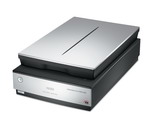
The July/August 2010 issue of the “photo technique” magazine features an interesting article on digitally proofing photographs, introducing a workflow using an Epson Perfection V750 (GT-X970) & SilverFast Ai “… For this, the Epson V750 (Epson GT-X970) paired with SilverFast Ai is the best choice I know.” (Jean-Christian Rostagni) |
- Flachbett-Scanner mit Transparent-Einheit (max.ca. 20cm x 25cm)
- Optische Auflösung: 6.400 x 9.600 dpi
- Farbtiefe: 48 Bit (intern & extern)
- inkl. Filmhalter für Dias, 35mm Filmstreifen und Panorama-Mittelformatfilme, sowie 4x5" Planfilme
Authentic colors: For calibrating your scanner, we recommend our patented and award-winning Auto-IT8-Kalibrierung using a calibration target from our own production in combination with SilverFast Ai Studio or Archive Suite.
(There are third-party targets included with the scanner, which are not suitable for the SilverFast Auto IT8 Calibration.)
Fast, high-quality scanning: Thanks to Epson Matrix CCD technology and an optical resolution of 6,400dpi, every detail is faithfully captured. With fast, energy-efficient Epson ReadyScan LED technology, there’s virtually no warm-up time, so you can start scanning your photos and films almost instantly.



-

SilverFast Ai Studio
ab 99,00 € Ausführung wählen Dieses Produkt weist mehrere Varianten auf. Die Optionen können auf der Produktseite gewählt werden
-
SilverFast SE
ab 49,00 € Ausführung wählen Dieses Produkt weist mehrere Varianten auf. Die Optionen können auf der Produktseite gewählt werden
-
SilverFast SE Plus
ab 50,00 € Ausführung wählen Dieses Produkt weist mehrere Varianten auf. Die Optionen können auf der Produktseite gewählt werden